1 / 6
Waves CLA MixDown: Mixing Plugin
The mix bus is the last stop before mastering
so engineers often add bass shelving EQ
treble for sparkle
a “glue” compressor
and console emulation. Or at least they did before CLA MixDown—which combines
optimizes
and expands these processors to deliver the ultimate mix bus plugin.
Grammy winner Chris Lord-Alge’s legendary mixes have graced the music of Foo Fighters
Bruce Springsteen
the Rolling Stones
Green Day
and so many more. He knows what a mix bus needs—here it is.
“I’ve taken my two favorite mix bus chains and put them under the hood of this supercharged plugin. Two flavors of my mix bus compression
plus console overdrive and a finishing EQ with perfect bass and treble curves. You can use MixDown on your master bus—or the CLA way
on a master aux. You can add it after you finish mixing for that final touch—but I recommend you insert it before you start mixing
then mix through it to help you nail your mix fast.”—Chris Lord-Alge
The Master’s Touch
MixDown encapsulates the power and detail of Chris Lord-Alge’s favorite mix bus processors. This plugin isn’t just about effects but represents the experience he’s gained over decades of mixing hits for musical superstars.Choose Your Mix Glue
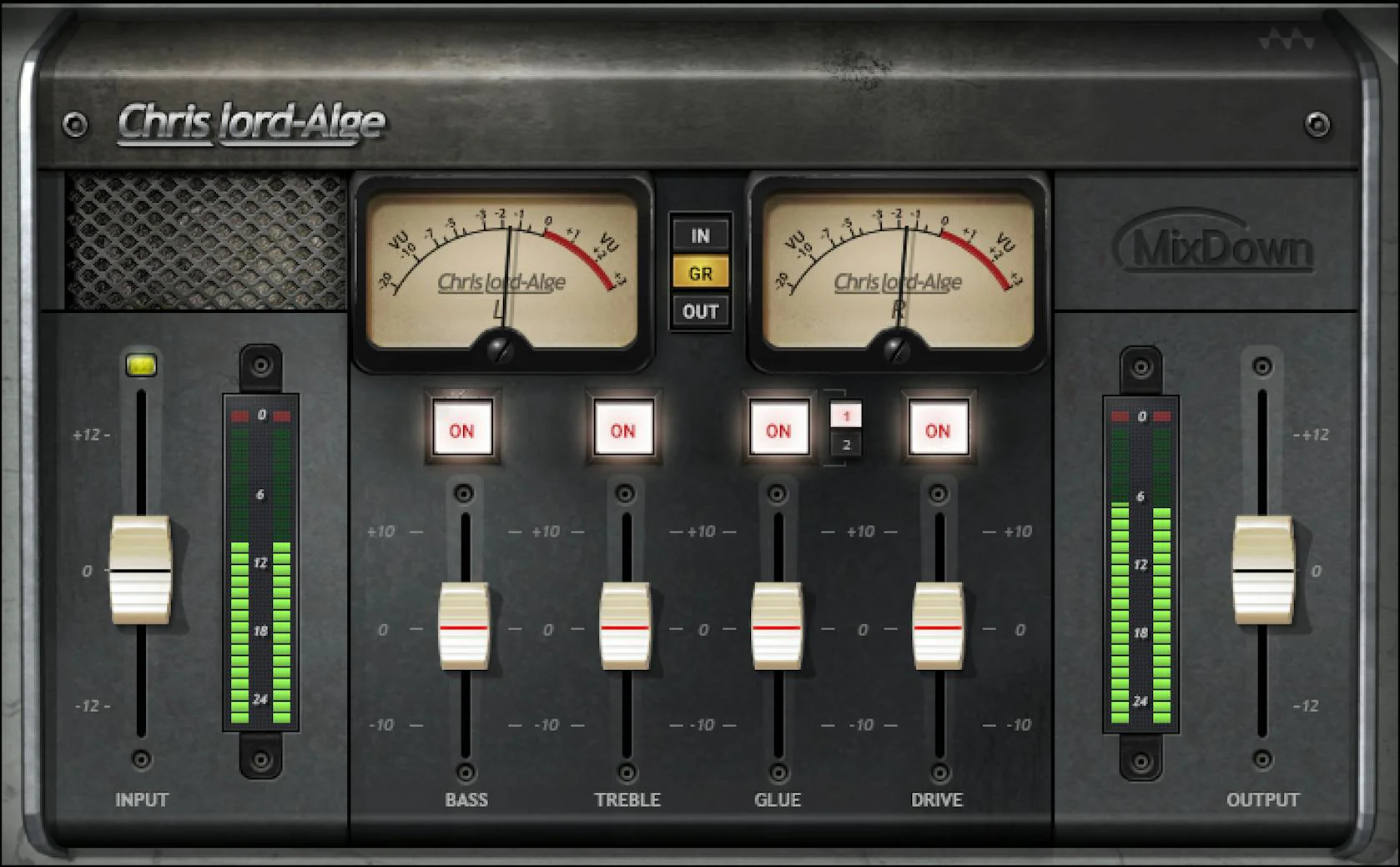
“Glue” compressors tie your tracks together into a tight unified cohesive listening experience. With MixDown’s Glue fader choose the compression flavor best for your music—modern and punchy (1) or vintage and controlled with a longer time constant great for holding the mix together (2).Equalization Coloration
Equalization needs to be at the right frequency with the right slope and the right amount. The Low control adds idealized shelving EQ for bass—from big to booming—while the treble EQ creates a bell curve for sparkle and clarity.Drive Your Mix Bus to the Max
The Drive control feeds an emulated SSL console mix bus. Keep Drive down for a natural sound push it up more to add a taste of harmonic distortion or turn it up all the way for character and grit.A Model of Simplicity
While developing MixDown with Waves Chris Lord-Alge emphasized the importance of speed in the creative process. Although there’s sophisticated modeling “under the hood ” the transparent interface gets results fast.Features:
- Two flavors of “glue” compression deliver dazzling dynamics
- Emulate an overdriven SSL console for color—or push for grit
- Exceptionally effective but with a simple interface
- Four modules provide crucial mix bus processors
- Creates the best possible mix for mastering
- Mix through MixDown as the mix develops or add as the final step
Requirements:
| Platform | CPU | RAM | Disk | Notes | Additional Requirement | Audio Card | Ports | Internet Required | 32 Bit Support | 64 Bit Support | Plugins |
| mac | Intel or Silicon Architecture | 8 | 16 | Minimum: 1024x768 Recommended: 1280x1024 / 1600x1024 USB displays are not supported as the primary display. | 0 | 0 | 0 | ||||
| windows | X64 compatible Intel or AMD CPU | 0 | 0 | Minimum: 1024x768 Recommended: 1280x1024 / 1600x1024 | 0 | 0 | 0 |
$3,879.00
Waves CLA MixDown: Mixing Plugin—
$3,879.00
Product Information
Product Information
Shipping & Returns
Shipping & Returns
Description
The mix bus is the last stop before mastering
so engineers often add bass shelving EQ
treble for sparkle
a “glue” compressor
and console emulation. Or at least they did before CLA MixDown—which combines
optimizes
and expands these processors to deliver the ultimate mix bus plugin.
Grammy winner Chris Lord-Alge’s legendary mixes have graced the music of Foo Fighters
Bruce Springsteen
the Rolling Stones
Green Day
and so many more. He knows what a mix bus needs—here it is.
“I’ve taken my two favorite mix bus chains and put them under the hood of this supercharged plugin. Two flavors of my mix bus compression
plus console overdrive and a finishing EQ with perfect bass and treble curves. You can use MixDown on your master bus—or the CLA way
on a master aux. You can add it after you finish mixing for that final touch—but I recommend you insert it before you start mixing
then mix through it to help you nail your mix fast.”—Chris Lord-Alge
The Master’s Touch
MixDown encapsulates the power and detail of Chris Lord-Alge’s favorite mix bus processors. This plugin isn’t just about effects but represents the experience he’s gained over decades of mixing hits for musical superstars.Choose Your Mix Glue
“Glue” compressors tie your tracks together into a tight unified cohesive listening experience. With MixDown’s Glue fader choose the compression flavor best for your music—modern and punchy (1) or vintage and controlled with a longer time constant great for holding the mix together (2).Equalization Coloration
Equalization needs to be at the right frequency with the right slope and the right amount. The Low control adds idealized shelving EQ for bass—from big to booming—while the treble EQ creates a bell curve for sparkle and clarity.Drive Your Mix Bus to the Max
The Drive control feeds an emulated SSL console mix bus. Keep Drive down for a natural sound push it up more to add a taste of harmonic distortion or turn it up all the way for character and grit.A Model of Simplicity
While developing MixDown with Waves Chris Lord-Alge emphasized the importance of speed in the creative process. Although there’s sophisticated modeling “under the hood ” the transparent interface gets results fast.Features:
- Two flavors of “glue” compression deliver dazzling dynamics
- Emulate an overdriven SSL console for color—or push for grit
- Exceptionally effective but with a simple interface
- Four modules provide crucial mix bus processors
- Creates the best possible mix for mastering
- Mix through MixDown as the mix develops or add as the final step
Requirements:
| Platform | CPU | RAM | Disk | Notes | Additional Requirement | Audio Card | Ports | Internet Required | 32 Bit Support | 64 Bit Support | Plugins |
| mac | Intel or Silicon Architecture | 8 | 16 | Minimum: 1024x768 Recommended: 1280x1024 / 1600x1024 USB displays are not supported as the primary display. | 0 | 0 | 0 | ||||
| windows | X64 compatible Intel or AMD CPU | 0 | 0 | Minimum: 1024x768 Recommended: 1280x1024 / 1600x1024 | 0 | 0 | 0 |