1 / 7
Playfair Audio Dynamic Grading: Dynamic Grading Plugin
With Dynamic Grading
you can precisely shape and control different parts of your audio’s dynamic range. Thanks to its dynamic histograms and intuitive graphical control
advanced dynamic processing becomes easier than ever before.
Land A Punch
Hit your listeners with precise impact. Create depth by placing tracks up front or at a distance.Keep the Body in Shape
Usher tracks to their right place in the mix. Make instruments solid as a rock or shake the dust off and make it groove.Swipe the Floor
Dial in just the right amount of detail and reverb. Clean up unwanted noise and make your mix shine.Introducing: The Dynamic Histogram
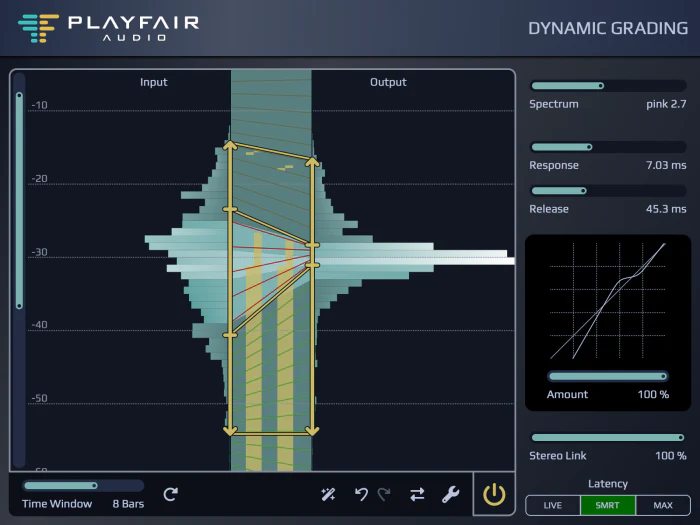
Dynamic Grading is centered around dynamic histograms. Imagine a really fast-moving level meter and a superhuman statistician sitting in front of it and gathering statistics of the readings over time. This kind of graph tells us a lot about audio dynamics. It reveals the dynamic range (the highest and lowest readings) as well which loudness regions are most prominent and how much perceived loudness varies (= how dynamic it is). A sharp peak in the graph hints at rather static audio with low dynamic range while a broad and flat shape means there is a lot of dynamic variation.Intuitive Graphical Control
Remember threshold and ratio knobs? Having to use those when adjusting compressors or expanders was fun while it lasted. But we can do better! Just specify where the relevant dynamic ranges are in the source audio (left markers) and where you want them to be in the result (right markers). Dynamic histograms guide you to quickly find the sweet spots. When the target range is narrower than the corresponding source range this part of the dynamic range will be compressed. If it is wider it’s an expansion. Simple and seamless!The Anatomy of Audio Dynamics
In Dynamic Grading you work independently with the three fundamental dynamic regions. The body range is where the “meat” of the signal is such as vocal timbre or note sustains of instruments. Right above the punch range is home to transients consonants percussive elements and note onsets. Finally the floor contains elements like late decay of instrument notes reverb or background noise. Think of it as the “space between notes”.Make Sound Decisions
Tightly control depth perception by adjusting the punch. Compress to get smoother onsets and a sense of distance expand to increase impact and position a track front and center. Compress the body to make the most prominent features sit firmly in the mix. Create more space by expanding the body when a track totally clogs your mix bus. Adjust reverberation and background noise with the floor range. Expand to smoothly reduce reverb or noise and gently clean up a recording. Or squeeze it for weird and fascinating artistic effects.Mixing The Dynamic Grading Way
Ready to fully embrace the Dynamic Grading Workflow? Drop it on every track and leave all faders at 0 dB. That way you can basically paint your mix by placing individual tracks in the dynamic range right where they belong. We don’t say you should mix without even listening but well with Dynamic Grading you probably could…New in Dynamic Grading v1.3
List:
- Enhanced User Interface Layout and Design - The GUI has been refined for clarity and efficiency. Level meters and curve displays are now always visible with rearranged sliders that show current values editable via keyboard. The grading handles feature a slimmer and more intuitive design.
- Improved DSP Engine with Variable Stereo Link - Users can now seamlessly transition from fully linked stereo operation to dual-mono or anywhere in between thanks to the new Variable Stereo Link slider.
- Source Learn - This feature automatically analyses the Dynamic Histogram and suggests initial settings for source ranges maintaining effective ratios for punch body and floor ranges. This significantly speeds up the initial setup and adaptation of existing settings to new source material.
- Reference Compare - A one-button A/B comparison tool allows quick comparisons between the current setting and the state when the plugin window was last opened. Users can set the current "reference" state manually by holding the Alt key while clicking the Reference Compare button.
- Undo/Redo - Familiar Undo and Redo buttons provide the flexibility to tweak audio dynamics with confidence knowing adjustments can be easily reversed.
- Safety Limiter - To protect against unexpectedly loud peaks when expanding the punch range the Safety Limiter automatically reduces output levels when the output peak exceeds +6 dBFS.
Features:
- Land A Punch
- Keep the Body in Shape
- Swipe the Floor
Requirements:
| Platform | CPU | RAM | Disk | Notes | Additional Requirement | Audio Card | Ports | Internet Required | 32 Bit Support | 64 Bit Support | Plugins |
| mac | Apple Silicon or Intel CPU | 4 | 0 | 0 | 0 | 1 | VST-3 AU AAX | ||||
| windows | 2GHz CPU | 4 | 0 | 0 | 0 | 1 | VST-3 AAX |
$4,956.00
Original: $16,520.00
-70%Playfair Audio Dynamic Grading: Dynamic Grading Plugin—
$16,520.00
$4,956.00Product Information
Product Information
Shipping & Returns
Shipping & Returns
Description
With Dynamic Grading
you can precisely shape and control different parts of your audio’s dynamic range. Thanks to its dynamic histograms and intuitive graphical control
advanced dynamic processing becomes easier than ever before.
Land A Punch
Hit your listeners with precise impact. Create depth by placing tracks up front or at a distance.Keep the Body in Shape
Usher tracks to their right place in the mix. Make instruments solid as a rock or shake the dust off and make it groove.Swipe the Floor
Dial in just the right amount of detail and reverb. Clean up unwanted noise and make your mix shine.Introducing: The Dynamic Histogram
Dynamic Grading is centered around dynamic histograms. Imagine a really fast-moving level meter and a superhuman statistician sitting in front of it and gathering statistics of the readings over time. This kind of graph tells us a lot about audio dynamics. It reveals the dynamic range (the highest and lowest readings) as well which loudness regions are most prominent and how much perceived loudness varies (= how dynamic it is). A sharp peak in the graph hints at rather static audio with low dynamic range while a broad and flat shape means there is a lot of dynamic variation.Intuitive Graphical Control
Remember threshold and ratio knobs? Having to use those when adjusting compressors or expanders was fun while it lasted. But we can do better! Just specify where the relevant dynamic ranges are in the source audio (left markers) and where you want them to be in the result (right markers). Dynamic histograms guide you to quickly find the sweet spots. When the target range is narrower than the corresponding source range this part of the dynamic range will be compressed. If it is wider it’s an expansion. Simple and seamless!The Anatomy of Audio Dynamics
In Dynamic Grading you work independently with the three fundamental dynamic regions. The body range is where the “meat” of the signal is such as vocal timbre or note sustains of instruments. Right above the punch range is home to transients consonants percussive elements and note onsets. Finally the floor contains elements like late decay of instrument notes reverb or background noise. Think of it as the “space between notes”.Make Sound Decisions
Tightly control depth perception by adjusting the punch. Compress to get smoother onsets and a sense of distance expand to increase impact and position a track front and center. Compress the body to make the most prominent features sit firmly in the mix. Create more space by expanding the body when a track totally clogs your mix bus. Adjust reverberation and background noise with the floor range. Expand to smoothly reduce reverb or noise and gently clean up a recording. Or squeeze it for weird and fascinating artistic effects.Mixing The Dynamic Grading Way
Ready to fully embrace the Dynamic Grading Workflow? Drop it on every track and leave all faders at 0 dB. That way you can basically paint your mix by placing individual tracks in the dynamic range right where they belong. We don’t say you should mix without even listening but well with Dynamic Grading you probably could…New in Dynamic Grading v1.3
List:
- Enhanced User Interface Layout and Design - The GUI has been refined for clarity and efficiency. Level meters and curve displays are now always visible with rearranged sliders that show current values editable via keyboard. The grading handles feature a slimmer and more intuitive design.
- Improved DSP Engine with Variable Stereo Link - Users can now seamlessly transition from fully linked stereo operation to dual-mono or anywhere in between thanks to the new Variable Stereo Link slider.
- Source Learn - This feature automatically analyses the Dynamic Histogram and suggests initial settings for source ranges maintaining effective ratios for punch body and floor ranges. This significantly speeds up the initial setup and adaptation of existing settings to new source material.
- Reference Compare - A one-button A/B comparison tool allows quick comparisons between the current setting and the state when the plugin window was last opened. Users can set the current "reference" state manually by holding the Alt key while clicking the Reference Compare button.
- Undo/Redo - Familiar Undo and Redo buttons provide the flexibility to tweak audio dynamics with confidence knowing adjustments can be easily reversed.
- Safety Limiter - To protect against unexpectedly loud peaks when expanding the punch range the Safety Limiter automatically reduces output levels when the output peak exceeds +6 dBFS.
Features:
- Land A Punch
- Keep the Body in Shape
- Swipe the Floor
Requirements:
| Platform | CPU | RAM | Disk | Notes | Additional Requirement | Audio Card | Ports | Internet Required | 32 Bit Support | 64 Bit Support | Plugins |
| mac | Apple Silicon or Intel CPU | 4 | 0 | 0 | 0 | 1 | VST-3 AU AAX | ||||
| windows | 2GHz CPU | 4 | 0 | 0 | 0 | 1 | VST-3 AAX |