1 / 2
Melda MDrumStrip: Drum Plugin
When it comes to crafting the perfect drum mix
having the right tools at your disposal can make all the difference. We have created a game-changer in the world of drum mixing with MDrumStrip. This powerful plugin is designed to enhance and shape your drum tracks
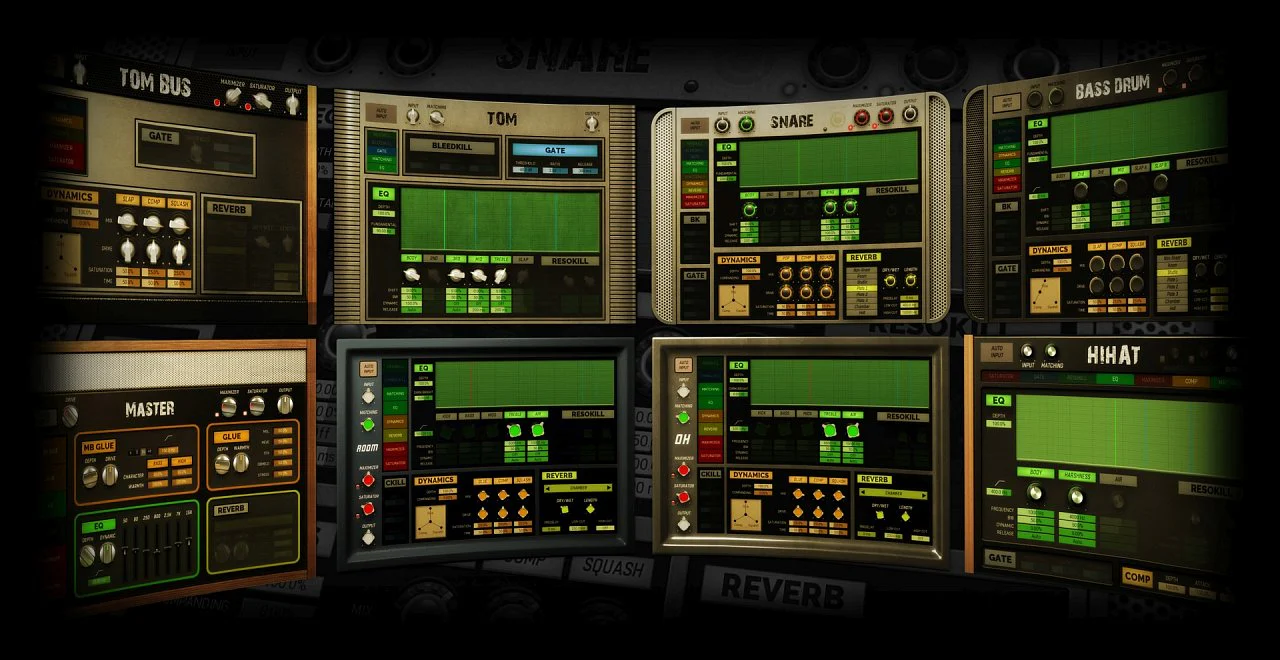
providing a comprehensive set of tools to achieve professional-sounding results. MDrumStrip is a powerful plugin specifically for semi-automatic drum mixing. The plugin contains a device for every stage of a drum mix (kick
snare
toms
hi-hat
OH
room
tom bus
master and parallel bus).
All you have to do to mix your drums right is basically to route the drum tracks the right way. Put the right devices on the right tracks. Analyze each and fine-tune.
Mix your drum kit within minutes
Basically you can just follow this easy walkthough and your drums are mixed in a few minutes.Use on individual tracks if you wish
But you may also use MDrumStrip devices independently for every drum. Each device contains an intelligent analyzer input matching dedicated EQ dynamic section and reverb. MDrumStrip offers a wide range of features tailored specifically for drum processing making it an indispensable tool for producers engineers and musicians alike. One of its standout features is the intuitive interface which combines simplicity with advanced control. Whether you're a seasoned professional or just starting out MDrumStrip provides a user-friendly environment to shape your drum sounds to perfection.Grab the FREE trial
To see how MDrumStrip works it's best to grab the 15-days fully working trial version and mix your own projects.Get it FREE
MDrumStrip can also be obtained for free within MMixingFXBundle MCompleteBundle and MTotalFXBundle (you also get it for free if you already own any of these bundles - Melda upgrades them for free. MDrumStrip can also be used within MDrummer and MSoundFactory environments without a need for a license.Features:
- 1) Send all your drums to one bus and insert MDrumStrip (select the device Master)
- 2) Engage an instance of MDrumStrip on every drum channel and select the appropriate device (device Snare on Snare drum etc.)
- 3) Solo your snare drum and analyze the sound by turning on the Auto Input for a few seconds.
- 4) Fine-tune by toggling the EQ frequencies.
- 5) Use the XY pad to tweak the dynamics.
- 6) Use bleed kill and gate if necessary.
- 7) Repeat the process for bass drum toms hi-hat overheads and rooms.
- 8) Create a Tom bus channel and send all toms tracks to it. Load MDrumStrip (select Tom bus device). Hit Auto Input to analyze.
- 9) Now that individual drums are ready switch to the drum master bus and hit the Auto Input button.
- 10) Create a parallel bus load MDrumStrip (Parallel device) send all tracks to it and analyze.
- 11) Use the saved time to have some rest.
Requirements:
| Platform | CPU | RAM | Disk | Notes | Additional Requirement | Audio Card | Ports | Internet Required | 32 Bit Support | 64 Bit Support | Plugins |
| mac | 0 | 0 | 0 | 0 | 0 | ||||||
| windows | 0 | 0 | 0 | 0 | 0 |
$10,610.40
Original: $35,368.00
-70%Melda MDrumStrip: Drum Plugin—
$35,368.00
$10,610.40Product Information
Product Information
Shipping & Returns
Shipping & Returns
Description
When it comes to crafting the perfect drum mix
having the right tools at your disposal can make all the difference. We have created a game-changer in the world of drum mixing with MDrumStrip. This powerful plugin is designed to enhance and shape your drum tracks
providing a comprehensive set of tools to achieve professional-sounding results. MDrumStrip is a powerful plugin specifically for semi-automatic drum mixing. The plugin contains a device for every stage of a drum mix (kick
snare
toms
hi-hat
OH
room
tom bus
master and parallel bus).
All you have to do to mix your drums right is basically to route the drum tracks the right way. Put the right devices on the right tracks. Analyze each and fine-tune.
Mix your drum kit within minutes
Basically you can just follow this easy walkthough and your drums are mixed in a few minutes.Use on individual tracks if you wish
But you may also use MDrumStrip devices independently for every drum. Each device contains an intelligent analyzer input matching dedicated EQ dynamic section and reverb. MDrumStrip offers a wide range of features tailored specifically for drum processing making it an indispensable tool for producers engineers and musicians alike. One of its standout features is the intuitive interface which combines simplicity with advanced control. Whether you're a seasoned professional or just starting out MDrumStrip provides a user-friendly environment to shape your drum sounds to perfection.Grab the FREE trial
To see how MDrumStrip works it's best to grab the 15-days fully working trial version and mix your own projects.Get it FREE
MDrumStrip can also be obtained for free within MMixingFXBundle MCompleteBundle and MTotalFXBundle (you also get it for free if you already own any of these bundles - Melda upgrades them for free. MDrumStrip can also be used within MDrummer and MSoundFactory environments without a need for a license.Features:
- 1) Send all your drums to one bus and insert MDrumStrip (select the device Master)
- 2) Engage an instance of MDrumStrip on every drum channel and select the appropriate device (device Snare on Snare drum etc.)
- 3) Solo your snare drum and analyze the sound by turning on the Auto Input for a few seconds.
- 4) Fine-tune by toggling the EQ frequencies.
- 5) Use the XY pad to tweak the dynamics.
- 6) Use bleed kill and gate if necessary.
- 7) Repeat the process for bass drum toms hi-hat overheads and rooms.
- 8) Create a Tom bus channel and send all toms tracks to it. Load MDrumStrip (select Tom bus device). Hit Auto Input to analyze.
- 9) Now that individual drums are ready switch to the drum master bus and hit the Auto Input button.
- 10) Create a parallel bus load MDrumStrip (Parallel device) send all tracks to it and analyze.
- 11) Use the saved time to have some rest.
Requirements:
| Platform | CPU | RAM | Disk | Notes | Additional Requirement | Audio Card | Ports | Internet Required | 32 Bit Support | 64 Bit Support | Plugins |
| mac | 0 | 0 | 0 | 0 | 0 | ||||||
| windows | 0 | 0 | 0 | 0 | 0 |