1 / 2
DJ.Studio Pro: DJ Software – Professional Audio Software & Plugin
Prepare DJ sets
create radio shows
and make video mixes with unparalleled speed and accuracy - all from your laptop
with no hardware required. Effortlessly craft precise
seamless transitions using our unique timeline-based suite of DJ tools
used and loved by over 200
000 DJs. Whether you're a bedroom DJ or a headliner on the biggest stages
DJ.Studio provides the features you need to maximize your creativity and productivity. Until now
producing finished DJ mixes required a DJ controller and live mixing
meaning a one-hour mix took one hour of recording time – assuming no mistakes. Alternatively
you could use a music production DAW
but these have a steep learning curve and are designed for producing music
not for DJ mixing. This is where DJ.Studio comes in - a DAW for DJs
bridging the gap between traditional DJ mixing and desktop-based studio software. From music discovery
to mix editing and flexible exporting
DJ.Studio provides all the tools you need to make full
professional-sounding DJ mixes from start to finish… Super fast DJ Mixing with zero live fails
DJ.Studio Pro-Edition: Features
Unlock your full potential with DJ.Studio ‘Pro-Edition’ made for the more advanced DJs. This comprehensive suite of tools enables DJs to prepare and create mixes with masterful expression and an expanded set of features like automations mastering and VST effects. Apply StemCreate Your Playlist
Create playlists for your mixes by importing music from a range of sources. Connect your local music libraries including iTunes rekordbox Serato VirtualDJ Mixed In Key Engine DJ and Traktor or simply browse your local files using MP3 WAV AIFF FLAC and more. You can even create mixes with online streaming files from Beatport or Beatsource and purchase the tracks when you want to export your mix allowing you to try out different songs before committing to buy them.AI-Powered Automix Assistant
Automix takes your playlist to the next level using millions of calculations to perfectly order your tracks by tempo and key. Using Harmonic Mixing Automix ensures musically cohesive transitions avoiding awkward clashing keys. Customize your mix by selecting the starting and ending tracks and set your preferences for transition length presets and mix-in points. Automix also automatically beat-syncs tracks with different tempos giving you a flawless DJ mix with a consistent groove.Refine Your Transitions
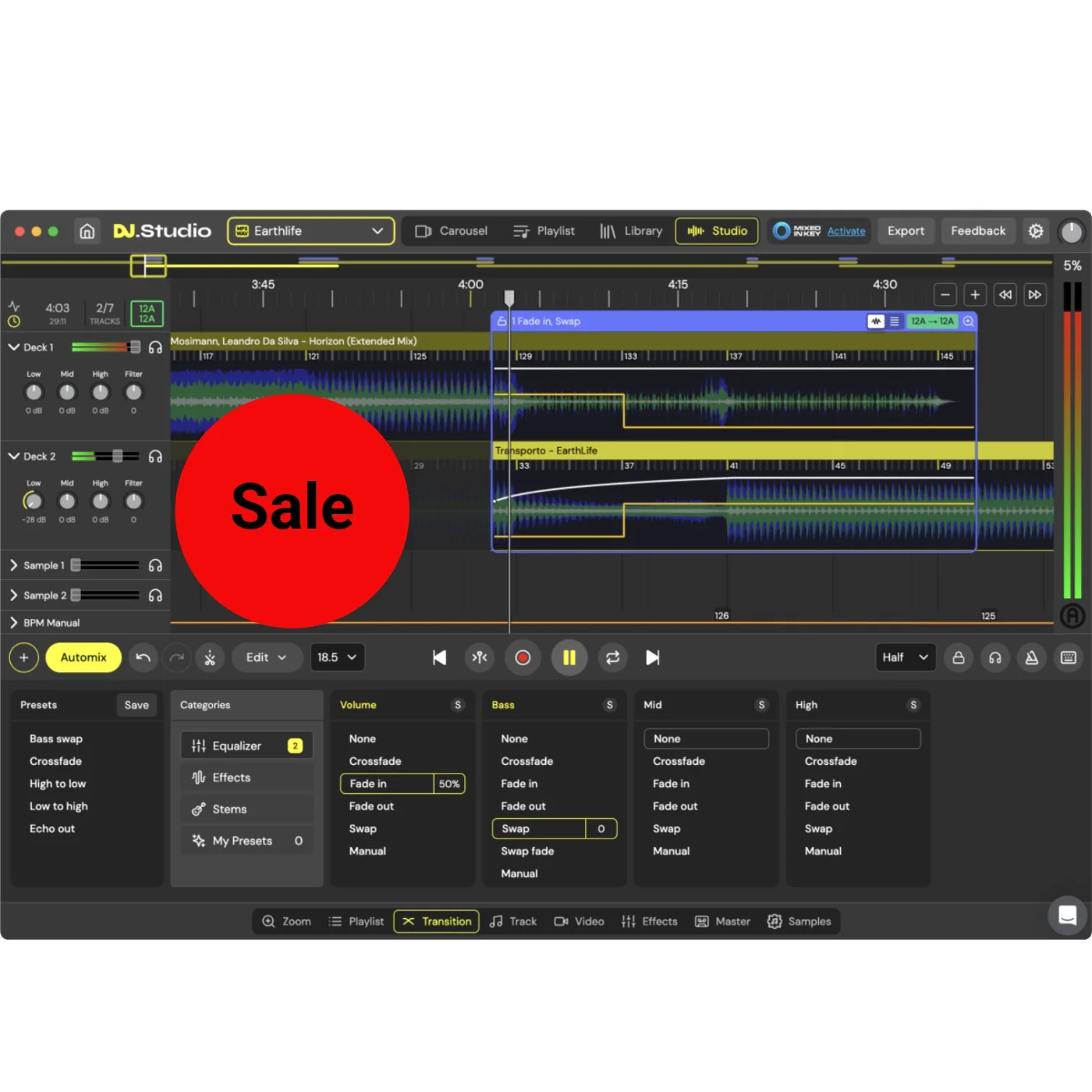
In the Studio timeline editor you can fine-tune every transition. Select the perfect mix-in and mix-out points and explore our range of prepared transition presets complete with curves and styles for volume equalizer and effects. Adjust each transition until it sounds perfect then move on to the next.Manual Automation Editor
The manual automation editor gives you control over any parameter through the flexible timeline system. Stack effects EQ volume and other automation controls simultaneously enabling you to create mixes and transitions that go beyond what two hands and decks can achieve - giving you the mixing prowess of an octopus. This gives endless depth to your expression so you can create mixes that truly display your style and creativity as a DJ.Edit Your Tracks
Imprint your signature sound by editing tracks to your liking. Cut out sections duplicate parts or move segments to different spots within the track creating a unique and customized mix. Use the advanced automation editor to edit tracks in endless detail creating unique mashups and remixes.Extra Sample Lanes
Adding custom samples and sound effects allows you to imprint your unique sonic style and personality onto your mixes. Whether you prefer airhorns risers scratching gunshots breaks ID tags or any other type of sound effect you can easily incorporate your sample library into your mix. Blend them in smoothly using our powerful editing tools for a truly personalized touch.Audio-Reactive Visuals for Video Export
Transform your DJ mixes with our video engine adding audio-reactive visuals for an immersive experience. Customize your mixes with animations transitions album art text and effects. Choose from 100 reactive animations and over 30 000 3D Shadertoy graphics to create stunning personalized videos. Enhance the engagement and excitement of your mixes using this intuitive suite of visual design tools and upload your high quality video mixes to YouTube to turn them into powerful promotional tools.Share Your DJ Mixes With The World!
Export your mix as an MP3 or WAV file directly to your hard drive or create a high-quality video file with chapter information for easy YouTube uploads. Additionally you can export your playlist as an M3U file for live performances ready to be imported into your live software. For rekordbox users export your DJ set complete with Cue points for a prepared performance. The Pro-Edition lets you export your mix to Ableton for additional mixing and mastering and includes all your automation and edits.Studio View
List:
- Change BPM
- Edit your transitions
- Default and custom transition presets
- Apply manual automations
- Add video visuals
- Add your own samples
- Add VST effects
- MP3 and WAV files
- High quality Video files
- DJ Set
- Mixcloud
- Ableton live
- Re-pitch audio
- Local file downloads
- rekordbox
- Mixed in Key
- Serato
- Engine DJ
- Virtual DJ
- Apple Music
- Traktor Pro
- iTunes
Export
Supported Libraries
Features:
- Automix
- Drag and drop tracks
- Supported file types for import WAV/AIFF/AIF/M4A/FLAC
- Work offline
Requirements:
| Platform | CPU | RAM | Disk | Notes | Additional Requirement | Audio Card | Ports | Internet Required | 32 Bit Support | 64 Bit Support | Plugins |
| mac | Core processor Intel newer than 2017 or Silicon | 8 | 4 | 0 | 0 | 0 | |||||
| windows | Core processor Intel or AMD newer than 2017 | 8 | 4 | 0 | 0 | 0 |
$4,956.00
Original: $16,520.00
-70%DJ.Studio Pro: DJ Software – Professional Audio Software & Plugin—
$16,520.00
$4,956.00Product Information
Product Information
Shipping & Returns
Shipping & Returns
Description
Prepare DJ sets
create radio shows
and make video mixes with unparalleled speed and accuracy - all from your laptop
with no hardware required. Effortlessly craft precise
seamless transitions using our unique timeline-based suite of DJ tools
used and loved by over 200
000 DJs. Whether you're a bedroom DJ or a headliner on the biggest stages
DJ.Studio provides the features you need to maximize your creativity and productivity. Until now
producing finished DJ mixes required a DJ controller and live mixing
meaning a one-hour mix took one hour of recording time – assuming no mistakes. Alternatively
you could use a music production DAW
but these have a steep learning curve and are designed for producing music
not for DJ mixing. This is where DJ.Studio comes in - a DAW for DJs
bridging the gap between traditional DJ mixing and desktop-based studio software. From music discovery
to mix editing and flexible exporting
DJ.Studio provides all the tools you need to make full
professional-sounding DJ mixes from start to finish… Super fast DJ Mixing with zero live fails
DJ.Studio Pro-Edition: Features
Unlock your full potential with DJ.Studio ‘Pro-Edition’ made for the more advanced DJs. This comprehensive suite of tools enables DJs to prepare and create mixes with masterful expression and an expanded set of features like automations mastering and VST effects. Apply StemCreate Your Playlist
Create playlists for your mixes by importing music from a range of sources. Connect your local music libraries including iTunes rekordbox Serato VirtualDJ Mixed In Key Engine DJ and Traktor or simply browse your local files using MP3 WAV AIFF FLAC and more. You can even create mixes with online streaming files from Beatport or Beatsource and purchase the tracks when you want to export your mix allowing you to try out different songs before committing to buy them.AI-Powered Automix Assistant
Automix takes your playlist to the next level using millions of calculations to perfectly order your tracks by tempo and key. Using Harmonic Mixing Automix ensures musically cohesive transitions avoiding awkward clashing keys. Customize your mix by selecting the starting and ending tracks and set your preferences for transition length presets and mix-in points. Automix also automatically beat-syncs tracks with different tempos giving you a flawless DJ mix with a consistent groove.Refine Your Transitions
In the Studio timeline editor you can fine-tune every transition. Select the perfect mix-in and mix-out points and explore our range of prepared transition presets complete with curves and styles for volume equalizer and effects. Adjust each transition until it sounds perfect then move on to the next.Manual Automation Editor
The manual automation editor gives you control over any parameter through the flexible timeline system. Stack effects EQ volume and other automation controls simultaneously enabling you to create mixes and transitions that go beyond what two hands and decks can achieve - giving you the mixing prowess of an octopus. This gives endless depth to your expression so you can create mixes that truly display your style and creativity as a DJ.Edit Your Tracks
Imprint your signature sound by editing tracks to your liking. Cut out sections duplicate parts or move segments to different spots within the track creating a unique and customized mix. Use the advanced automation editor to edit tracks in endless detail creating unique mashups and remixes.Extra Sample Lanes
Adding custom samples and sound effects allows you to imprint your unique sonic style and personality onto your mixes. Whether you prefer airhorns risers scratching gunshots breaks ID tags or any other type of sound effect you can easily incorporate your sample library into your mix. Blend them in smoothly using our powerful editing tools for a truly personalized touch.Audio-Reactive Visuals for Video Export
Transform your DJ mixes with our video engine adding audio-reactive visuals for an immersive experience. Customize your mixes with animations transitions album art text and effects. Choose from 100 reactive animations and over 30 000 3D Shadertoy graphics to create stunning personalized videos. Enhance the engagement and excitement of your mixes using this intuitive suite of visual design tools and upload your high quality video mixes to YouTube to turn them into powerful promotional tools.Share Your DJ Mixes With The World!
Export your mix as an MP3 or WAV file directly to your hard drive or create a high-quality video file with chapter information for easy YouTube uploads. Additionally you can export your playlist as an M3U file for live performances ready to be imported into your live software. For rekordbox users export your DJ set complete with Cue points for a prepared performance. The Pro-Edition lets you export your mix to Ableton for additional mixing and mastering and includes all your automation and edits.Studio View
List:
- Change BPM
- Edit your transitions
- Default and custom transition presets
- Apply manual automations
- Add video visuals
- Add your own samples
- Add VST effects
- MP3 and WAV files
- High quality Video files
- DJ Set
- Mixcloud
- Ableton live
- Re-pitch audio
- Local file downloads
- rekordbox
- Mixed in Key
- Serato
- Engine DJ
- Virtual DJ
- Apple Music
- Traktor Pro
- iTunes
Export
Supported Libraries
Features:
- Automix
- Drag and drop tracks
- Supported file types for import WAV/AIFF/AIF/M4A/FLAC
- Work offline
Requirements:
| Platform | CPU | RAM | Disk | Notes | Additional Requirement | Audio Card | Ports | Internet Required | 32 Bit Support | 64 Bit Support | Plugins |
| mac | Core processor Intel newer than 2017 or Silicon | 8 | 4 | 0 | 0 | 0 | |||||
| windows | Core processor Intel or AMD newer than 2017 | 8 | 4 | 0 | 0 | 0 |