Darkglass Electronics M200 Microtubes 200W Bass Amplifier
Darkglass Electronics M200 Microtubes 200W Bass Amplifier Overview:
The Microtubes 200 is slimmer and lighter than ever. Packed with Aux-in and headphone output for quiet practicing and an intuitive push potentiometer for the mute and master control. Pre/bypassed DI XLR Out with switchable ground lift making these amps reliable for all sorts of musicians with an ample array of possibilities.
Front Panel Features:
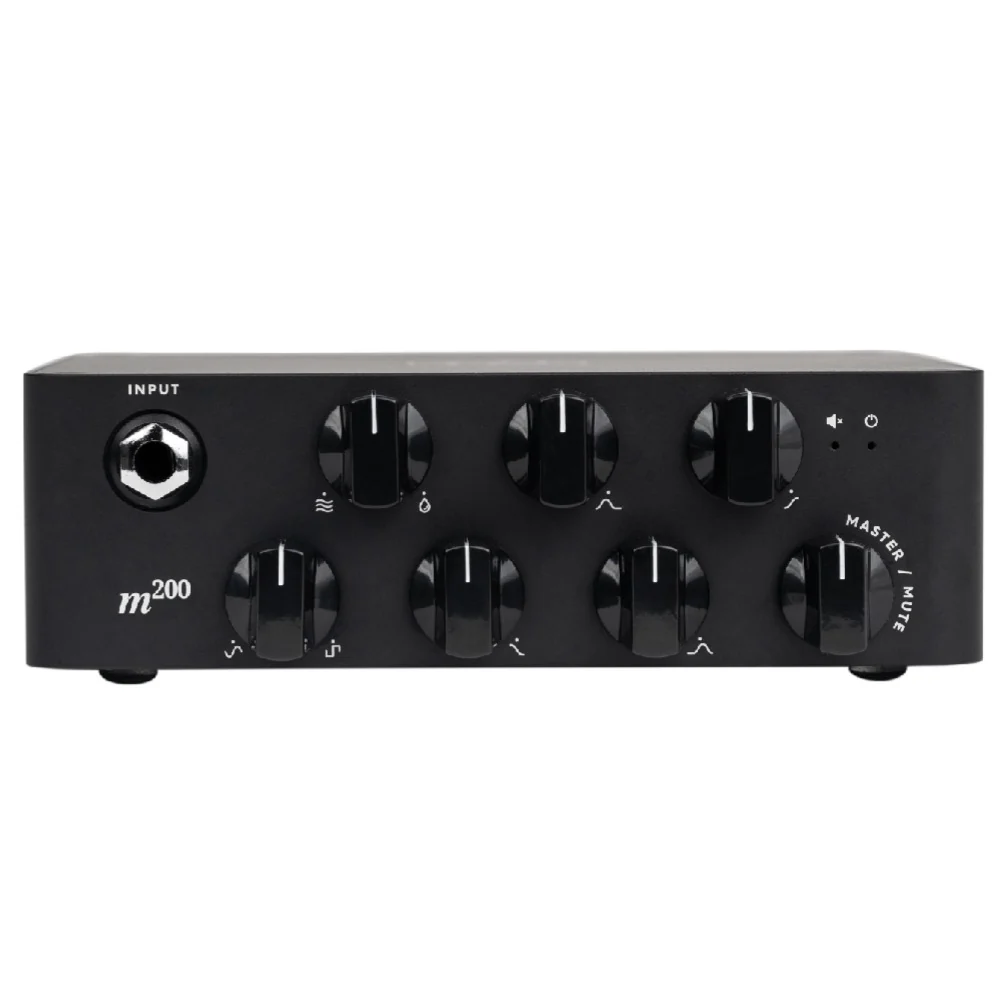
- Input: Use this jack to connect your instrument via a standard ¼” mono cable.
- Drive: This knob controls the amount of distortion that the Microtubes B3K® Engine will deliver. It will change from a soft warm overdrive to a massive modern distortion sound.
- Blend: Use this knob to mix between the Clean signal and the Distortion signal (Microtubes B3K Engine).
- Bass: +-12dB at 80Hz. Use this knob to change the low-end content of the signal.
- Low Mids: +-12dB at 1kHz. This knob controls the low mid content of the signal.
- High Mids: +-12dB at 3kHz. This knob controls the high mid content of the signal.
- Treble: +-12dB at 5kHz. Use this knob to change the high content of the signal.
- Master/Mute: Use this knob to control the overall volume of the amplifier. Use this push knob button to mute the speaker out.
- Dimensions
- Width: 15 cm / 6″
- Length: 15.7 cm / 6¼”
- Height: 5.2 cm / 2″
- Weight: 0.965 kg / 2.12 lb
- Width: 15 cm / 6″
Back Panel Features:
- Speaker Output: Use this connector to connect the amplifier to your cabinet. This Speakon combo jack allows for either Speakon or ¼” speaker cable operation.
- Ground Lift: Use this control to lift the ground of the DI XLR output. If you are experiencing ground noise in your DI signal try changing the setting of this control.
- DI Output: Use this connector to send your bypass signal to the console, mic preamp, interface, etc. The DI OUTPUT delivers only the bypass DI signal.
- AC Socket: Use this connector to feed electric power to the amplifier. 100 – 230 VAC, 50-60Hz.
- AC Power Off: Use this Switch to release the audio energy from your bass.
- Headphone Output: Connect your Headphones and enjoy the analog cabinet emulation.
- Aux In: Use this connector to play music from your laptop, phone, MP3 player, etc. This input is routed only to the headphone output without cabinet emulation.
Product Information
Product Information
Shipping & Returns
Shipping & Returns
Description
Darkglass Electronics M200 Microtubes 200W Bass Amplifier Overview:
The Microtubes 200 is slimmer and lighter than ever. Packed with Aux-in and headphone output for quiet practicing and an intuitive push potentiometer for the mute and master control. Pre/bypassed DI XLR Out with switchable ground lift making these amps reliable for all sorts of musicians with an ample array of possibilities.
Front Panel Features:
- Input: Use this jack to connect your instrument via a standard ¼” mono cable.
- Drive: This knob controls the amount of distortion that the Microtubes B3K® Engine will deliver. It will change from a soft warm overdrive to a massive modern distortion sound.
- Blend: Use this knob to mix between the Clean signal and the Distortion signal (Microtubes B3K Engine).
- Bass: +-12dB at 80Hz. Use this knob to change the low-end content of the signal.
- Low Mids: +-12dB at 1kHz. This knob controls the low mid content of the signal.
- High Mids: +-12dB at 3kHz. This knob controls the high mid content of the signal.
- Treble: +-12dB at 5kHz. Use this knob to change the high content of the signal.
- Master/Mute: Use this knob to control the overall volume of the amplifier. Use this push knob button to mute the speaker out.
- Dimensions
- Width: 15 cm / 6″
- Length: 15.7 cm / 6¼”
- Height: 5.2 cm / 2″
- Weight: 0.965 kg / 2.12 lb
- Width: 15 cm / 6″
Back Panel Features:
- Speaker Output: Use this connector to connect the amplifier to your cabinet. This Speakon combo jack allows for either Speakon or ¼” speaker cable operation.
- Ground Lift: Use this control to lift the ground of the DI XLR output. If you are experiencing ground noise in your DI signal try changing the setting of this control.
- DI Output: Use this connector to send your bypass signal to the console, mic preamp, interface, etc. The DI OUTPUT delivers only the bypass DI signal.
- AC Socket: Use this connector to feed electric power to the amplifier. 100 – 230 VAC, 50-60Hz.
- AC Power Off: Use this Switch to release the audio energy from your bass.
- Headphone Output: Connect your Headphones and enjoy the analog cabinet emulation.
- Aux In: Use this connector to play music from your laptop, phone, MP3 player, etc. This input is routed only to the headphone output without cabinet emulation.